








Price: ₹9,999 - ₹3,499.00
(as of Aug 26, 2025 17:36:06 UTC – Details)
Product Description
KVM Switch HDMI

HDMI KVM 2 Computers Share 1 Monitor
KVM switches feature four USB 3.0 ports, allowing you to connect mice, keyboards, and other USB devices, providing ample connectivity options without worrying about insufficient ports.This HDMI KVM switch is equipped with an EDID emulator. When you connect a laptop to a larger display via KVM, it can intelligently retain your originally set resolution, window position, and size during switching, eliminating the need for frequent adjustments and greatly enhancing your workflow smoothness and efficiency.Our 2 port KVM switch boasts 4K 60Hz high-resolution display, delivering smooth and vibrant visuals that will immerse you in your professional work or entertainment.Equipped with EQ enhancement functionality, this KVM switch effectively handles signal attenuation and distortion, ensuring clear and stable signals even at a transmission distance of up to 100 feet (50-foot input and 50-foot output).
HDMI KVM – Your New Choice for Efficient Connection in Office & Entertainment Scenarios

With the USB KVM Switch, you can seamlessly share a high-definition display between two computers. Whether you’re looking to immerse yourself in a cinematic experience, enjoy gaming, or efficiently tackle work tasks, a single button press facilitates a seamless transition, vastly enhancing both your entertainment and work experiences.Are you tired of the tangled mess of wires on your desk? With an HDMI KVM switch, you can share a single high-definition monitor and a set of mouse and keyboard between two computers, getting rid of the intricate cables. It provides you with a neat and organized work environment, refreshing your workspace.A must-have for multimedia education and conference presentations – the KVM! Effortlessly manage content between multiple computers and achieve efficient information sharing. Choose the best KVM switch to make your presentation stand out even more.

KVM Switch HDMI: Say Goodbye to Constant Unplugging and Replugging
The 2 computers one monitor switch makes sharing multiple devices effortless. Imagine your computer A needing to access a printer connected to computer B, or any other USB device; simply pressing the KVM switch button will enable seamless switching between devices.The KVM can quickly and automatically identify connected devices, eliminating the need for constant unplugging and replugging, thereby streamlining your workflow.

Equipped with a 2K144HZ high refresh rate, this HDMI KVM switch offers an even more comfortable and smooth gaming visual experience.

This 2 port KVM switch offers you more USB connection options. (USB C is the power interface, please make sure to plug in the power supply to ensure the best performance of the KVM switch.)

This HDMI kvm switch is equipped with heat dissipation holes on both sides, aiming to extend its service life effectively and provide you with the highest cost-effectiveness.

This HDMI KVM is designed with an LED indicator, making it easy for you to immediately identify the computer that is currently in operation.

What should I do if there is no video output after connecting the cables correctly ?
Ensure that both the display interface and the computer’s interface are HDMIWhen connecting for the first time, the KVM needs to read the EDID information from the display. Restarting the computer can effectively solve the problem of no video output. Is it necessary to connect power when using a USB KVM switch?
Yes. Connecting to power ensures more stable operation of the KVM.
Package Contains 1x HDMI KVM Switch 2x USB3.0 Cable 1x USB-C Power Cable 1x Desktop Switch Cable 1x User Manual
【KVM Switch 1 Monitors 2 Computers】This HDMI KVM switch is specifically designed for Mac and PC users, allowing you to easily share one monitor and four USB devices, including keyboard, mouse, printer, and hard drive. Its plug-and-play design effectively improves your work efficiency.
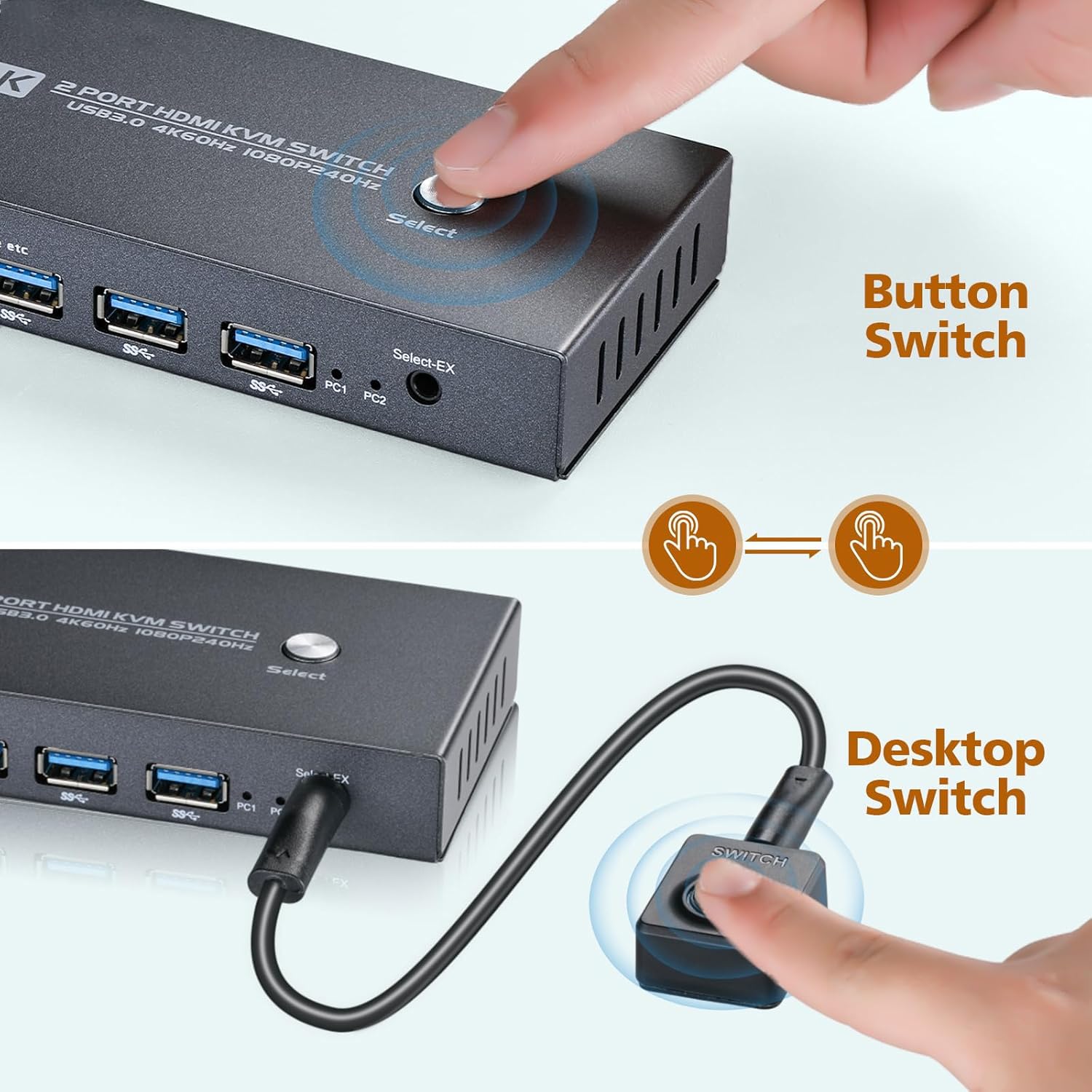
【2 Switching Methods for Quick Switching】With this KVM Switch HDMI, you can freely switch between two computers via button switching or desktop switching. The switching process only takes 1-2 seconds. At the same time, our Mac and PC KVM Switch has two LED indicators to let you know which computer is running currently.
【Powerful Compatibility】The KVM Switch HDMI is perfectly compatible with computer systems such as Mac, Windows, and Linux. Regardless of the operating system you use, it guarantees optimal performance, delivering a smoother and more efficient work experience.
【Four USB 3.0 Ports】Equipped with USB 3.0 ports, this HDMI KVM supports ultra-fast file transfer speeds of up to 5Gbps, which is 10 times faster than USB 2.0 ports. This significantly enhances the efficiency of file and image transfer, enabling you to work more efficiently.
【Superb 4K Office Image Quality】This HDMI KVM boasts a 4K 60Hz HD display for ultimate clarity. Ideal for graphic design, document review, and multitasking, it enhances work ease and efficiency with an exceptional visual experience
【EDID Emulation】This KVM Switch HDMI features EDID emulation, accurately simulating display information to maintain consistent window layout and seamless transitions between computers, making it suitable for efficient office workers such as IT operators, multitaskers, and designers.
【Superb Adaptability】This KVM Switch HDMI easily adapts to various monitor types, featuring intelligent recognition and configuration. You can enjoy clear and stable visuals without any manual adjustments. It’s suitable for multiple working scenarios, meeting your diverse needs.
【Packing List】KVM Switch1, USB 3.0 Cable2 (5 feet), USB-C Power Cable1 (3.3 feet with charging adapter), Desktop Switch Cable1 (5 feet), User Manual*1
Customers say
Customers find the KVM switch works well, with one mentioning it functions perfectly between laptop and desktop setups. The product receives positive feedback for its quality and ease of use.


